
How to Connect DataWise to Grok Bot and Build an SEO Team of Bots
Connect DataWise to Grok Bot in about a minute, then set up three Bots that research, write and publish SEO content on real data. The setup, the roles and the rules that keep it safe.
TL;DR
- DataWise now connects to Grok Bot, the AI agent app from xAI. You give a Bot the DataWise server address, approve the login, and DataWise shows up under Connected Apps.
- Once it is connected, any of your Bots can pull live keyword data, rankings, backlinks, Search Console data, People Also Ask questions and AI visibility data without you exporting a single CSV.
- We used it to build a three-Bot SEO team: Scout researches, Quill writes and Press publishes drafts for you to approve.
- The full Bot templates are inside the AI Ranking community, which is also where DataWise access comes from.

What is Grok Bot?
Grok Bot is an AI agent app where each Bot has its own job, its own instructions and its own memory, and works on a cloud computer it can use like you would. You talk to a Bot in chat, and it can browse, run tools, follow schedules and hand work to other Bots.
The detail that matters most for an SEO team is that the computer is shared. The Grok Bot docs say “every Bot on your account uses the same computer” and that “the computer is assigned to your user account, not an individual Bot” (Grok Bot computer and apps docs). Files one Bot saves can be read by the next one, which is how three Bots can pass a brief, a draft and a finished page down the line.
How much does Grok Bot cost?
Grok Bot starts at $30 a month on the Premium plan. Super costs $100 a month for 3.5 times the usage, and Ultra costs $200 a month for 12 times the usage.
Cursor’s help center confirms Grok Bot is “included on Premium, Super, and Ultra” on The X Subscription, while Plus and Free do not include it, and legacy paid Cursor plans still do (Grok Bot plans). Every plan includes the Bot’s own computer, sign-ins to your tools, routines on a schedule and a weekly usage allowance. These were the individual prices in October 2026:
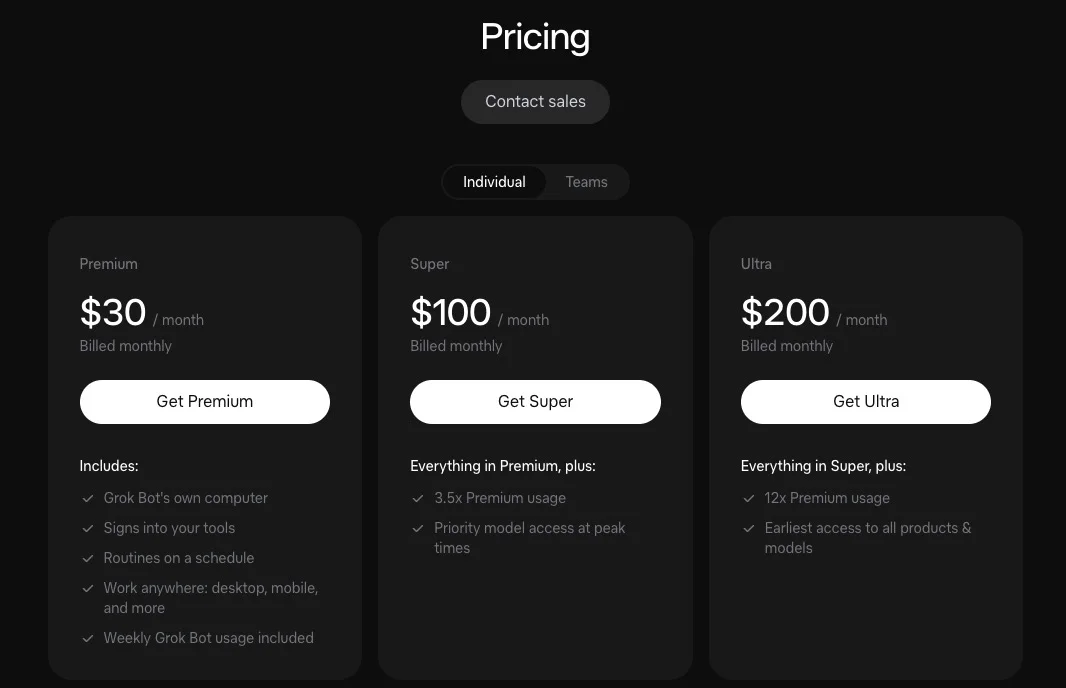
For a three-Bot SEO team that runs one research cycle a week, Premium is enough to start. Upgrade only if the weekly allowance runs out before the week does.
How do you connect DataWise to Grok Bot?
Tell any Bot to add a custom server named DataWise at https://mcp.datawiseseo.com/mcp, click Authorize on the card it shows you, and log in to your DataWise account. That is the whole setup.

Here is what happens in practice:
- Open a chat with a Bot and type: add a custom server named DataWise at https://mcp.datawiseseo.com/mcp.
- The Bot replies with an authorization card. Click Authorize.
- A DataWise login page opens. Sign in with the same Google account or email you use for the app, and approve the connection.
- Open Connect apps. DataWise is listed with 1 connector and the status Connected.
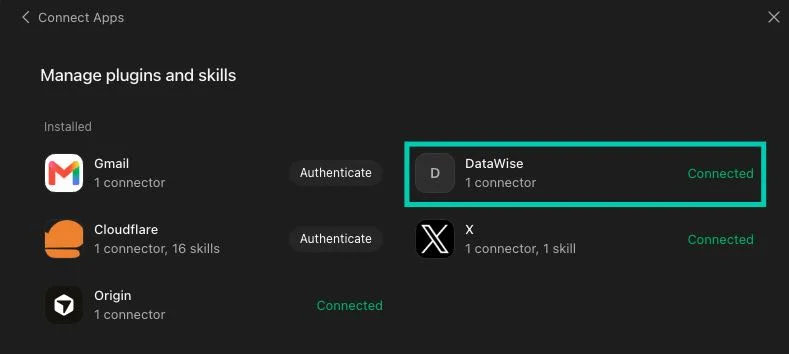
The connection uses OAuth, so you never paste a password or an API key into the chat. You can see and revoke the connection at any time under Connected apps in your DataWise settings.
Why does connecting once give every Bot access?
Connectors in Grok Bot belong to your account, not to one Bot. You add DataWise in one chat, and every Bot you create after that can use it.
The docs say it plainly: “Installed connectors are account-wide” (Grok Bot computer and apps docs). For a team, that means the research Bot, the writer and the publisher all reach the same data without three separate setups.
It also means a separate Bot is not a privacy wall. Anything one Bot can reach, the others can reach too, so give the team only the access it needs.
What can a Grok Bot do with DataWise connected?
It can run 14 read-only DataWise tools covering keyword research, keyword metrics, ranked keywords, competitor and keyword gap analysis, backlinks, domain overviews, People Also Ask, AI visibility and AI mentions, rank tracking, Search Console data and Google Business Profile audits. Every tool reads data. None of them can change your site or your DataWise projects.
DataWise speaks MCP, the Model Context Protocol, which its maintainers describe as “an open-source standard for connecting AI applications to external systems” (Model Context Protocol). The same server that works in Grok Bot also works in Claude and ChatGPT, which is covered on the DataWise SEO MCP server page.
Grok Bot’s own advice points the same way. The docs say to “prefer a connector when one is available: it is often more reliable than clicking through a website” (Grok Bot computer and apps docs). A Bot asking DataWise for keyword volumes gets clean numbers back. A Bot trying to read the same numbers off a web page has to click, scroll and guess.
Why build a team of Bots instead of one big Bot?
Because each step of SEO content needs different tools, different rules and a different level of trust. Research only reads data, writing only produces drafts, and publishing touches your live website, so splitting them keeps the risky step small and easy to check.
The Grok Bot docs recommend handing off work so that each stage has one clear owner: “Ask for a single owner at each stage,” because “too many parallel handoffs can create duplicate work and noisy updates” (Grok Bot chat and collaboration docs). A group chat can hold “two to six Bots” (same source), so three is well inside the limit.

Here is how we split the work:
| Bot | Job | Uses DataWise? | Can it change your site? |
|---|---|---|---|
| Scout (research) | Finds the one page worth creating or refreshing this week and writes a brief | Yes, for every number in the brief | No. Read and report only |
| Quill (writer) | Turns the brief into a citation-ready page, publish package and images | Reads Scout’s brief | No. Drafts only |
| Press (publisher) | Builds the page as a draft in your CMS and asks you to approve | No | Only after you reply “approved” |
What does Scout, the research Bot, do?
Scout runs every Monday morning, pulls this week’s data from DataWise and picks a single opportunity backed by numbers. The output is a short brief Quill can write from without asking a single question.
Scout starts with Search Console data: queries sitting in positions 4 to 20, pages on page one with a weak click-through rate, and pages losing clicks. Then it checks keyword gaps against your competitors, validates the pick with keyword volume and difficulty, pulls the real People Also Ask questions, and checks whether you or your competitors get mentioned by AI search engines.
Two rules keep its briefs honest. It never invents a number, so every figure comes from a tool call it made that week. And if you already have a page ranking for the topic, it recommends refreshing that page instead of creating a second one that would split your rankings.
What does Quill, the writer Bot, do?
Quill writes the page so it can rank on Google and get quoted by AI search. It answers each heading’s question in the first sentence or two, then backs up that answer with sourced paragraphs right underneath.
That is the same answer-capsule method we use on this blog. AI engines tend to lift one specific sentence and attach a link to it, so every section starts with a sentence that makes sense on its own. If you want the background on why that works, read our guide on query fan-out in AI search.
Quill never makes up statistics, quotes, reviews or experience. Business facts come only from the site profile Scout builds during setup. Where the page needs something only you know, such as a real price you quoted this year, Quill leaves a visible marker for you to fill in.
What does Press, the publisher Bot, do?
Press logs in to your website, builds Quill’s page as a draft, previews it and sends you an approval message. It publishes only after you reply “approved” to that specific page.
Press gets its own low-permission login (on WordPress, the Author role, never Administrator). You log it in yourself by taking over its screen, so no password goes through the chat. Its approval request lists anything still missing, such as a marker Quill left or a photo you need to add, plus the links it plans to add from other pages.
Approvals and logins have to happen in Press’s own chat, not the group. The docs note that “approval requests, secret and login requests, and email or Slack drafts do not appear in a group” (Grok Bot chat and collaboration docs).
How do the three Bots hand work to each other?
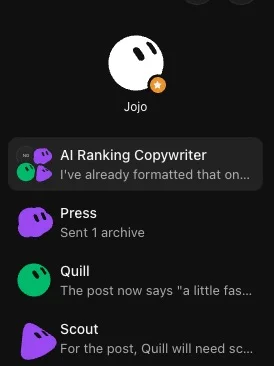
Through files on the shared computer and short @mentions in one group chat. Scout saves the brief and tags Quill, Quill saves the draft and tags Press, and Press messages you for approval.
To set up the group, start a new chat and select all three Bots. Ours is called “AI Ranking Copywriter”, and it sits in the sidebar next to each Bot’s own chat:
Files carry the work because memory does not move between Bots. Scout’s research and Quill’s drafts live in one project folder that every Bot can read. Skills, on the other hand, are shared: “Private skills are one library shared by all your Bots” (Grok Bot skills and routines docs).
Only Scout has a schedule. It starts the chain on Monday, and the other two only act when they are tagged. That keeps the Bots from chatting back and forth, since every Bot-to-Bot message uses part of your weekly allowance.
How should you roll this out on your own site?
Run each Bot by hand until it works reliably, then save the method and only then put it on a schedule. Don’t automate a step you haven’t watched work.
That order comes straight from the docs: “Start with a one-time task. Make it reliable, save the method as a skill, and only then automate it” (Grok Bot skills and routines docs). For this team, that means:
- Connect DataWise and run Scout’s setup interview so it knows your business.
- Ask Scout for one brief and check the numbers against the DataWise app.
- Have Quill write from that brief and read the draft closely before you trust the next one.
- Give Press its login and let it build one draft, then delete the test draft.
- Turn on Scout’s Monday routine.
If you want to check whether the pages the team publishes actually get picked up by AI search, our guide on how to know if ChatGPT and Perplexity cite your website walks through it.
Where do you get the three Bots?
The ready-made Scout, Quill and Press templates, with their full instructions and skills, are shared inside the AI Ranking community. Membership also includes DataWise, which Scout needs for its research.
When you install a template, connect DataWise again on your own account, because connections don’t travel with templates. Also check that Scout’s Monday routine is switched on.
FAQ
Does Grok Bot need a DataWise API key?
No. The connection uses OAuth, so you log in to DataWise in your browser and approve it. Nothing secret is pasted into the chat, and you can revoke the connection from your DataWise settings.
Can the Bots change my rankings data or delete DataWise projects?
No. Every DataWise tool available to the Bots is read-only. They can look up data and read your existing projects, but they can’t create, edit or delete anything in DataWise.
Does the team work if I don’t use WordPress?
Yes, as long as your site has a dashboard Press can log in to. Press asks which CMS you use during setup, and it works with any of them that can save a draft and upload images, such as Webflow, Shopify or Wix.
Is there a limit on how much DataWise data the Bots can pull?
Yes. Each account has a daily data allowance for tools that request fresh data from our providers, and cached results don’t count against it. One weekly research run from Scout fits well inside it.
Can I use the same DataWise connection in Claude or ChatGPT?
Yes. The same server address works in Claude, ChatGPT and Grok Bot, and each one gets its own approval you can revoke separately. The setup for each app is on the DataWise MCP page.

Nicolas Gorrono
Founder of DataWise SEO and the AI Ranking community. Writing about SEO, AI search, and data-driven optimization.
Put these insights into action
Join the AI Ranking community to get unlimited DataWise access, included with your membership. 7-day risk-free trial.
Join AI Ranking